https://upload.jianshu.io/users/upload_avatars/9415503/6ac415b5-009a-4973-a794-ccade4c876b2.jpg?imageMogr2/auto-orient/strip|imageView2/1/w/240/h/240

Kubernetes零宕机滚动更新

滚动更新

默认情况下,Kubernetes 的 Deployment 是具有滚动更新的策略来进行 Pod 更新的,该策略可以在任何时间点更新应用的时候保证某些实例依然可以正常运行来防止应用 down 掉,当新部署的 Pod 启动并可以处理流量之后,才会去杀掉旧的 Pod。

CDH安装与部署

基础环境配置

安装环境信息

序号 服务器ID IP地址 操作系统
1 node01 10.0.0.7 CentOS 7.9
2 node02 10.0.0.14 CentOS 7.9
3 node03 10.0.0.22 CentOS 7.9

修改主机名

1
2
3
hostnamectl set-hostname node01
hostnamectl set-hostname node02
hostnamectl set-hostname node03

修改主机名映射

1
2
3
10.0.0.7 node01
10.0.0.14 node02
10.0.0.22 node03

关闭防火墙和Selinux

1
2
3
4
5
6
7
#关闭SELinux
setenforce 0
grep 'SELINUX=enforcing' /etc/selinux/config && sed -i 's/SELINUX=enforcing/SELINUX=disabled/' /etc/selinux/config

#关闭firewall
systemctl stop firewalld.service
systemctl disable firewalld.service

系统初始化参数调整 (设置swap和透明大页面)

 1
 2
 3
 4
 5
 6
 7
 8
 9
10
11
12
13
14
15
sysctl vm.swappiness=1
echo 'vm.swappiness=1' >> /etc/sysctl.conf
echo never > /sys/kernel/mm/transparent_hugepage/defrag
echo never > /sys/kernel/mm/transparent_hugepage/enabled
echo 'echo never > /sys/kernel/mm/transparent_hugepage/defrag' >> /etc/rc.local
echo 'echo never > /sys/kernel/mm/transparent_hugepage/enabled' >> /etc/rc.local

#设置集群的文件打开数
vim /etc/security/limits.d/20-nproc.conf
*         soft   nproc     409600
root      soft   nproc     unlimited

vim /etc/security/limits.conf
* hard nofile 655350
* soft nofile 655350

配置ssh免密登录

1
2
3
4
5
6
7
8
9
集群之间通过内网端口互相访问,配置ssh免密登录,注意开放外网端口需要配置iptables防火墙

#生成密码对 -所有节点
ssh-keygen -t rsa
   
#在每台节点分别执行以下命令
ssh-copy-id root@10.0.0.10
ssh-copy-id root@10.0.0.14
ssh-copy-id root@10.0.0.22

三台节点配置时钟同步 & 安装相关依赖包

1
2
3
4
5
6
# 安装
yum -y install gcc python-devel cyrus-sasl* chrony iotop yum-utils yum-plugin-downloadonly psmisc ntp ntpdate createrepo wget git rsync mod_ssl cyrus-sasl-plain cyrus-sasl-devel cyrus-sasl-gssapi libxslt krb5-devel cyrus-sasl-gssapi cyrus-sasl-devel libxml2-devel libxslt-devel openldap-devel python-devel python-simplejson sqlite-devel

# 时钟同步
systemctl start ntpd
systemctl enable ntpd

安装http服务

安装httpd服务

1、安装nginx

Frps使用说明

frp 简介

frp 让本地局域网的机器可以暴露到公网,简单的说就是在世界的任何地方,你可以访问家里开着的那台电脑。 FRP 支持 TCP、UDP、HTTP、HTTPS, 就是说不仅仅限于本地web服务器可以暴露,整台机器都可以暴露,windows的远程控制,mac和linux的ssh都可以被暴露。

Python第三方库大全

包管理

管理包和依赖的工具。

  • pip:Python 包和依赖关系管理工具。
  • pip-tools:保证 Python 包依赖关系更新的一组工具。
  • pipenv:Python 官方推荐的新一代包管理工具。
  • poetry: 可完全取代 setup.py 的包管理工具。
  • conda:跨平台,Python 二进制包管理工具。
  • Curdling:管理 Python 包的命令行工具。
  • wheel:Python 分发的新标准,意在取代 eggs。

分发

打包为可执行文件以便分发。

Kubernetes资源创建流程解析

组件之间的通信

我们知道在Kubernetes集群中apiserver是整个集群的控制入口,etcd在集群中充当数据库的作用,只有apiserver才可以直接去操作etcd集群,而我们的apiserver无论是对内还是对外都提供了统一的REST API服务,包括一个8080端口的非安全服务和6443端口的安全服务。组件之间当然也是通过apiserver进行通信的,其中kube-controller-managerkube-schedulerkubelet是通过apiserver watch API来监控我们的资源变化,并且对资源的相关状态更新操作也都是通过apiserver进行的,所以说白了组件之间的通信就是通过apiserver REST APIapiserver watch API进行的

Loki日志聚合系统

loki简介

Loki是 Grafana Labs 团队最新的开源项目,是一个水平可扩展,高可用性,多租户的日志聚合系统。它的设计非常经济高效且易于操作,因为它不会为日志内容编制索引,而是为每个日志流编制一组标签。项目受 Prometheus 启发,官方的介绍就是:Like Prometheus, but for logs.,类似于 Prometheus 的日志系统。

JVM调优参数解析

JVM参数说明

  • Xms 是指设定程序启动时占用内存大小。一般来讲,大点,程序会启动的快一点,但是也可能会导致机器暂时间变慢
  • Xmx 是指设定程序运行期间最大可占用的内存大小。如果程序运行需要占用更多的内存,超出了这个设置值,就会抛出OutOfMemory异常
  • Xss 是指设定每个线程的堆栈大小。这个就要依据你的程序,看一个线程大约需要占用多少内存,可能会有多少线程同时运行等

典型设置

堆大小设置

1、-Xmx 3550m -Xms 3550m -Xmn 2g -Xss 128k

Kubernetes安装

minikube 创建集群

安装kubelet

添加rpm源

1
2
3
4
5
6
7
8
9
cat << EOF |tee /etc/yum.repos.d/kubernetes.repo
[kubernetes]
name=Kubernetes
baseurl=https://mirrors.aliyun.com/kubernetes/yum/repos/kubernetes-el7-x86_64/
enabled=1
gpgcheck=1
repo_gpgcheck=0
gpgkey=https://mirrors.aliyun.com/kubernetes/yum/doc/yum-key.gpg https://mirrors.aliyun.com/kubernetes/yum/doc/rpm-package-key.gpg
EOF

安装kubectl

1
yum install -y kubectl --nogpgcheck

添加自动补全

1
2
3
yum install -y bash-completion
echo 'source <(kubectl completion bash)' >>~/.bashrc
kubectl completion bash >/etc/bash_completion.d/kubectl

安装minikube

  • 安装
1
curl -LO https://storage.googleapis.com/minikube/releases/latest/minikube-linux-amd64 && install minikube-linux-amd64 /usr/local/bin/minikube
  • 启动集群
1
2
3
4
yum install -y conntrack socat kubernetes-cni
echo 1 > /proc/sys/net/bridge/bridge-nf-call-iptables
minikube start --driver=none --network-plugin=cni --extra-config=kubeadm.ignore-preflight-errors=NumCPU --force --cpus 1
minikube start --driver=none --network-plugin=cni --image-mirror-country=cn --registry-mirror=https://f1z25q5p.mirror.aliyuncs.com
  • 初始化
 1
 2
 3
 4
 5
 6
 7
 8
 9
10
11
12
13
14
15
16
17
18
19
mv /root/.kube /root/.minikube $HOME
chown -R $USER $HOME/.kube $HOME/.minikube
cat >> ~/.bashrc <<- 'EOF'
alias kcp='kubectl get po -o wide  -n kube-system'
alias kcdp='kubectl delete po -n kube-system'
alias kcl='kubectl logs -f  -n kube-system'
alias kcs='kubectl get svc -n kube-system'
alias kcn='kubectl get nodes -o wide -n kube-system'
alias kce='kuebctl get endpoints -n kube-system'
alias kci='kuebctl get ing -n kube-system'
alias kcir='kubectl get ingressroute -n kube-system'
alias kca='kubectl apply -n kube-system'
alias kct='kubectl create -n kube-system'
alias kcd='kubectl describe po  -n kube-system'
alias kexec='kubectl exec -ti  -n kube-system'
alias kall='kubectl get svc,pods,nodes --all-namespaces -o wide -n kube-system'
alias kdel='kubectl delete  -n kube-system'
EOF
source ~/.bashrc
  • 启动dashboard
1
minikube dashboard
  • 安装网络插件
1
2
minikube start --network-plugin=cni
kubectl apply -f https://docs.projectcalico.org/manifests/calico.yaml

kubeadm 创建集群

服务器初始化

创建密码

1
cat /dev/urandom | tr -dc 'a-zA-Z0-9' | head -c 24 | tee ~/.init/sshkey

初始化系统配置

  • 关闭selinux
1
2
3
setenforce 0 \
        && sed -i 's/^SELINUX=.*$/SELINUX=disabled/' /etc/selinux/config \
        && getenforce
  • 关闭防火强
1
2
3
4
5
systemctl stop firewalld \
  && systemctl daemon-reload \
  && systemctl disable firewalld \
  && systemctl daemon-reload \
  && systemctl status firewalld
  • 关闭iptables
1
2
3
4
yum install -y iptables-services \
  && systemctl stop iptables \
  && systemctl disable iptables \
  && systemctl status iptables
  • 更新yum源
1
2
3
4
5
6
yum install wget -y
cp -r /etc/yum.repos.d /etc/yum.repos.d.bak
rm -f /etc/yum.repos.d/*.repo
wget -O /etc/yum.repos.d/CentOS-Base.repo http://mirrors.aliyun.com/repo/Centos-7.repo
wget -O /etc/yum.repos.d/epel.repo http://mirrors.aliyun.com/repo/epel-7.repo
yum clean all && yum makecache
  • 修改文件限制配置
1
2
3
4
5
6
7
cat >> /etc/security/limits.conf <<EOF
# End of file
* soft nproc 10240000
* hard nproc 10240000
* soft nofile 10240000
* hard nofile 10240000
EOF
  • 更新sysctl配置
 1
 2
 3
 4
 5
 6
 7
 8
 9
10
11
12
13
14
15
16
17
18
19
20
21
22
23
24
25
26
27
28
29
30
31
32
33
[ ! -e "/etc/sysctl.conf_bk" ] && /bin/mv /etc/sysctl.conf{,_bk} \
  && cat > /etc/sysctl.conf << EOF
# fs.file-max=1000000
# fs.nr_open=20480000
# net.ipv4.tcp_max_tw_buckets = 180000
# net.ipv4.tcp_sack = 1
# net.ipv4.tcp_window_scaling = 1
# net.ipv4.tcp_rmem = 4096 87380 4194304
# net.ipv4.tcp_wmem = 4096 16384 4194304
# net.ipv4.tcp_max_syn_backlog = 16384
# net.core.netdev_max_backlog = 32768
# net.core.somaxconn = 32768
# net.core.wmem_default = 8388608
# net.core.rmem_default = 8388608
# net.core.rmem_max = 16777216
# net.core.wmem_max = 16777216
# net.ipv4.tcp_timestamps = 0
# net.ipv4.tcp_fin_timeout = 20
# net.ipv4.tcp_synack_retries = 2
# net.ipv4.tcp_syn_retries = 2
# net.ipv4.tcp_syncookies = 1
# #net.ipv4.tcp_tw_len = 1
# net.ipv4.tcp_tw_reuse = 1
# net.ipv4.tcp_mem = 94500000 915000000 927000000
# net.ipv4.tcp_max_orphans = 3276800
# net.ipv4.ip_local_port_range = 1024 65000
# #net.nf_conntrack_max = 6553500
# #net.netfilter.nf_conntrack_max = 6553500
# #net.netfilter.nf_conntrack_tcp_timeout_close_wait = 60
# #net.netfilter.nf_conntrack_tcp_timeout_fin_wait = 120
# #net.netfilter.nf_conntrack_tcp_timeout_time_wait = 120
# #net.netfilter.nf_conntrack_tcp_timeout_established = 3600
# EOF
  • 关闭swap分区
1
2
swapoff -a| cp /etc/fstab /etc/fstab_bak
cat /etc/fstab_bak | grep -v swap > /etc/fstab
  • 配置时间同步
 1
 2
 3
 4
 5
 6
 7
 8
 9
10
11
12
yum install -y chrony
cp -rf /etc/chrony.conf{,.bak}
sed -i 's/^server/#&/' /etc/chrony.conf
cat >> /etc/chrony.conf << EOF
server 0.asia.pool.ntp.org iburst
server 1.asia.pool.ntp.org iburst
server 2.asia.pool.ntp.org iburst
server 3.asia.pool.ntp.org iburst
EOF
timedatectl set-timezone Asia/Shanghai
systemctl enable chronyd && systemctl restart chronyd
timedatectl && chronyc sources
  • 配置ipvs模块
 1
 2
 3
 4
 5
 6
 7
 8
 9
10
11
cat > /etc/sysconfig/modules/ipvs.modules <<EOF
modprobe -- ip_vs
modprobe -- ip_vs_rr
modprobe -- ip_vs_wrr
modprobe -- ip_vs_sh
modprobe -- nf_conntrack_ipv4
EOF
    chmod 755 /etc/sysconfig/modules/ipvs.modules && bash /etc/sysconfig/modules/ipvs.modules && lsmod | grep -e ip_vs -e nf_conntrack_ipv4
    yum install ipset ipvsadm -y
    sysctl --system
}

安装docker

1
curl -L https://gitee.com/YunFeiGuoJi/Cnblog/raw/master/shell/Scripts/docker_install.sh | sh -

配置环境

配置ipv4转发

1
2
3
4
5
6
cat <<EOF | sudo tee /etc/sysctl.d/k8s.conf
net.bridge.bridge-nf-call-ip6tables = 1
net.bridge.bridge-nf-call-iptables = 1
net.ipv4.ip_forward = 1
EOF
sudo sysctl --system

添加kubernetes yum源

 1
 2
 3
 4
 5
 6
 7
 8
 9
10
11
12
13
14
15
16
17
18
19
20
# cat <<EOF | sudo tee /etc/yum.repos.d/kubernetes.repo
# [kubernetes]
# name=Kubernetes
# baseurl=https://packages.cloud.google.com/yum/repos/kubernetes-el7-\$basearch
# enabled=1
# gpgcheck=1
# repo_gpgcheck=1
# gpgkey=https://packages.cloud.google.com/yum/doc/yum-key.gpg https://packages.cloud.google.com/yum/doc/rpm-package-key.gpg
# exclude=kubelet kubeadm kubectl
# EOF

cat << EOF |tee /etc/yum.repos.d/kubernetes.repo
[kubernetes]
name=Kubernetes
baseurl=https://mirrors.aliyun.com/kubernetes/yum/repos/kubernetes-el7-x86_64/
enabled=1
gpgcheck=1
repo_gpgcheck=1
gpgkey=https://mirrors.aliyun.com/kubernetes/yum/doc/yum-key.gpg https://mirrors.aliyun.com/kubernetes/yum/doc/rpm-package-key.gpg
EOF

安装kubernetes

1
2
3
4
sudo yum install -y kubelet-1.19.8 kubeadm-1.19.8 kubectl-1.19.8 --disableexcludes=kubernetes --nogpgcheck

sudo systemctl enable --now kubelet
sudo systemctl start kubelet

集群初始化

1
2
3
4
5
6
7
8
9
kubeadm init \
--apiserver-advertise-address 172.28.81.11 \
--image-repository registry.aliyuncs.com/google_containers \
--pod-network-cidr 10.244.0.0/16 \
--node-name k8s01

mkdir -p $HOME/.kube
sudo cp -i /etc/kubernetes/admin.conf $HOME/.kube/config
sudo chown $(id -u):$(id -g) $HOME/.kube/config

初始化node结点

1
2
kubeadm join 172.28.81.7:6443 --token 86n32f.kzmt9o2yxwehturv \
    --discovery-token-ca-cert-hash sha256:92f3be0c4daf60820d96855ff9787bdb0ed9cb5cbb7bd012d1ad123e6a2c4ecf

安装网络插件

配置.bashrc

 1
 2
 3
 4
 5
 6
 7
 8
 9
10
11
12
13
14
15
16
17
18
19
20
21
22
23
24
25
# 配置.bashrc
cp /etc/kubernetes/admin.conf /root/.kube/admin.conf
yum install bash-completion -y
cat >> ~/.bashrc <<EOF
source <(kubectl completion bash)
source /usr/share/bash-completion/bash_completion
source <(helm completion bash)
#export KUBECONFIG=/etc/kubernetes/admin.conf
# 配置别名
alias kocp='kubectl get po -o wide --kubeconfig=/root/.kube/admin.conf -n kube-system'
alias kocdp='kubectl delete po --kubeconfig=/root/.kube/admin.conf -n kube-system'
alias kocl='kubectl logs -f --tail 200 --kubeconfig=/root/.kube/admin.conf -n kube-system'
alias kocs='kubectl get svc  --kubeconfig=/root/.kube/admin.conf kube-system'
alias kocn='kubectl get nodes -o wide --kubeconfig=/root/.kube/admin.conf -n kube-system'
alias koce='kuebctl get endpoints --kubeconfig=/root/.kube/admin.conf -n kube-system'
alias koci='kuebctl get ing  --kubeconfig=/root/.kube/admin.conf -n kube-system'
alias kocir='kubectl get ingressroute --kubeconfig=/root/.kube/admin.conf -n kube-system'
alias koca='kubectl apply --kubeconfig=/root/.kube/admin.conf -n kube-system'
alias koct='kubectl create --kubeconfig=/root/.kube/admin.conf -n kube-system'
alias kocd='kubectl describe po  --kubeconfig=/root/.kube/admin.conf -n kube-system'
alias koexec='kubectl exec -ti  --kubeconfig=/root/.kube/admin.conf -n kube-system'
alias koall='kubectl get svc,pods,nodes --all-namespaces -o wide -n kube-system'
alias kodel='kubectl delete --kubeconfig=/root/.kube/admin.conf -n kube-system'
EOF
source ~/.bashrc

安装flanel

1
koct -f https://gitee.com/YunFeiGuoJi/Cnblog/raw/master/kubernetes/yml/kube-flannel.yml --kubeconfig=/root/.kube/admin.conf

安装calicos

  • 下载calicos yml文件
1
curl https://docs.projectcalico.org/manifests/calico-etcd.yaml -O
  • 配置etcd证书访问
1
2
3
etcd_ca: "/calico-secrets/etcd-ca"
etcd_cert: "/calico-secrets/etcd-cert"
etcd_key: "/calico-secrets/etcd-key"
  • 创建etcd secret
1
2
3
cat /etc/kubernetes/pki/etcd/ca.crt |base64 -w 0 > etcd_ca
cat /etc/kubernetes/pki/etcd/service.crt |base64 -w 0 > etcd_cert
cat /etc/kubernetes/pki/etcd/service.key |base64 -w 0 > etcd_key
  • 修改网卡
1
2
3
4
cat > /etc/NetworkManager/conf.d/calico.conf <<- 'EOF'
[keyfile]
unmanaged-devices=interface-name:cali*;interface-name:tunl*
EOF

配置污点

Master允许调度

1
kubectl taint node k8s01 node-role.kubernetes.io/master-

Master 禁止调度

1
kubectl taint node localhost.localdomain node-role.kubernetes.io/master="":NoSchedule

kubectl 安装使用

1
2
3
4
curl -LO "https://storage.googleapis.com/kubernetes-release/release/$(curl -s https://storage.googleapis.com/kubernetes-release/release/stable.txt)/bin/linux/amd64/kubectl"
# 安装指定版本
curl -LO https://storage.googleapis.com/kubernetes-release/release/v1.18.6/bin/linux/amd64/kubectl
curl -LO https://dl.k8s.io/release/v1.18.6/bin/linux/amd64/kubectl

Helm 安装使用

安装

1
wget https://get.helm.sh/helm-v3.3.3-linux-amd64.tar.gz && tar zxvf helm-v3.3.3-linux-amd64.tar.gz && mv linux-amd64/helm /usr/bin 

使用

 1
 2
 3
 4
 5
 6
 7
 8
 9
10
11
12
13
14
# 添加repo
helm repo add  elastic    https://helm.elastic.co
helm repo add  gitlab     https://charts.gitlab.io
helm repo add  harbor     https://helm.goharbor.io
helm repo add  bitnami    https://charts.bitnami.com/bitnami
helm repo add  incubator  https://kubernetes-charts-incubator.storage.googleapis.com
helm repo add  stable     https://charts.helm.sh/stable
helm repo add  aliyuncs   https://apphub.aliyuncs.com
helm repo add  traefik    https://containous.github.io/traefik-helm-chart
helm repo add  loki       https://grafana.github.io/loki/charts
helm repo add  stakater   https://stakater.github.io/stakater-charts
helm repo add  kubernetes-dashboard	 https://kubernetes.github.io/dashboard/
helm repo add  jaegertractracing     https://jaegertracing.github.io/helm-charts
helm repo update

kubernetes 维护管理

kubernetes 集群访问

通过kubectl config访问
  • 配置集群访问config
 1
 2
 3
 4
 5
 6
 7
 8
 9
10
11
12
13
14
15
16
17
18
19
20
21
22
23
cat > $HOME/.kube/config <<- 'EOF'
apiVersion: v1
clusters:
- cluster:
    #certificate-authority: /Users/admin/.minikube/ca.crt
    insecure-skip-tls-verify: true
    server: https://47.243.34.122:8443
  name: minikube
contexts:
- context:
    cluster: minikube
    namespace: default
    user: minikube
  name: minikube
current-context: minikube
kind: Config
preferences: {}
users:
- name: minikube
  user:
    client-certificate: /Users/admin/.minikube/client.crt
    client-key: /Users/admin/.minikube/client.key
EOF
通过token访问
  • 查看所有的集群,因为你的 .kubeconfig 文件中可能包含多个上下文
1
kubectl config view -o jsonpath='{"Cluster name\tServer\n"}{range .clusters[*]}{.name}{"\t"}{.cluster.server}{"\n"}{end}'
  • 从上述命令输出中选择你要与之交互的集群的名称
1
export CLUSTER_NAME="kubernetes"
  • 指向引用该集群名称的 API 服务器
1
APISERVER=$(kubectl config view -o jsonpath="{.clusters[?(@.name==\"$CLUSTER_NAME\")].cluster.server}")
  • 获得令牌
1
TOKEN=$(kubectl get secrets -o jsonpath="{.items[?(@.metadata.annotations['kubernetes\.io/service-account\.name']=='default')].data.token}"|base64 -d)
  • 使用令牌玩转 API
1
curl -X GET $APISERVER/api --header "Authorization: Bearer $TOKEN" --insecure
  • 使用jsonpath
1
2
3
APISERVER=$(kubectl config view --minify -o jsonpath='{.clusters[0].cluster.server}')
TOKEN=$(kubectl get secret $(kubectl get serviceaccount default -o jsonpath='{.secrets[0].name}') -o jsonpath='{.data.token}' | base64 --decode )
curl $APISERVER/api --header "Authorization: Bearer $TOKEN" --insecure
通过serviceaccount来访问
  • 创建serviceaccount
1
kubectl create serviceaccount kubernetes-devops
  • 创建ClusterRole、RoleBinding
1
2
3
4
5
6
7
8
kind: ClusterRole
apiVersion: rbac.authorization.k8s.io/v1beta1
metadata:
  name: kubernetes-devops
rules:
- apiGroups: [""] # "" indicates the core API group
  resources: ["pods", "services", "pods/log"]
  verbs: ["get", "watch", "list"]
  • 绑定clusterroule
1
kubectl create rolebinding kubernetes-devops-read --clusterrole kubernetes-devops --serviceaccount kubernetes-devops -n default
  • 获取token,ca crt,url

Linux正则匹配详解

前言

对于正则表达式,相信很多人都知道,但是很多人的第一感觉就是难学,因为看第一眼时,觉得完全没有规律可寻,而且全是一堆各种各样的特殊符号,完全不知所云。
DockerSwarm实践及原理

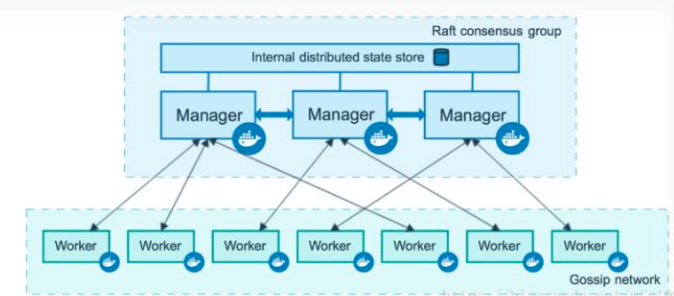
基本原理

Swarm 是使用Docker 引擎内置的集群管理和编排工具。Swarm集群的框架与Hadoop集群或其他分布式系统类似,它也是由节点构成,每一个节点就是一台主机或者虚拟机。工作的机制也是主从模式(master/slaver),节点分为两种,一种是负责管理的Manager另一种是具体干活的Worker。